ASCII smuggling hides characters inside text that can look ordinary on screen. Calling Unicode’s NFKC normalisation function does not automatically remove them. In the local Python example below, an invisible tag character survives normalisation and still breaks a literal word match. That distinction matters anywhere email, retrieved documents or support tickets feed an AI assistant.
Consider a security review of an assistant that reads incoming requests. The reviewer sees a familiar word. The application receives that word with an extra character in the middle. Both components are working with the same message, but they have different evidence about its contents. A screenshot cannot show the whole problem.
I would start the review with that small disagreement. Before debating how well the model resists a hidden instruction, establish what text actually reaches it, what your filter checked, and what the human approval screen displays.
What Microsoft reported, and when
On 3 September 2026, Microsoft Security Research, Noam Kochavi and Sarah Wolstencroft reported a phishing campaign that inserted invisible Unicode tag characters into financial keywords. Research into hidden instructions for AI assistants had surfaced a different use: disrupting text analysis of email lures.
The report describes a telemetry increase beginning on 9 February 2026 and a sharp reduction in the technique’s high-volume phase after 15 May. September is the disclosure date, not the start of the observed activity. Microsoft says more than 99% of the messages were flagged by other protection layers. Signature-hit volume should therefore not be read as successful delivery, victim count or proof that an entire mail-security product was bypassed.
The engineering question raised by the report is worth testing independently: when someone says their pipeline “normalises Unicode”, which transformation do they mean?
What ASCII smuggling means
In this context, ASCII smuggling uses non-rendering Unicode tag characters to carry or interrupt text while leaving little visible evidence. The name can be confusing: these are Unicode code points outside the ordinary ASCII range. Displaying a character and retaining it in a string are separate operations.
A code point is a numbered entry in Unicode. A rendered symbol may consist of several code points, and a code point may produce no visible mark. This is why a visual check, a string-length check and a text-matching operation can disagree without any of them crashing.
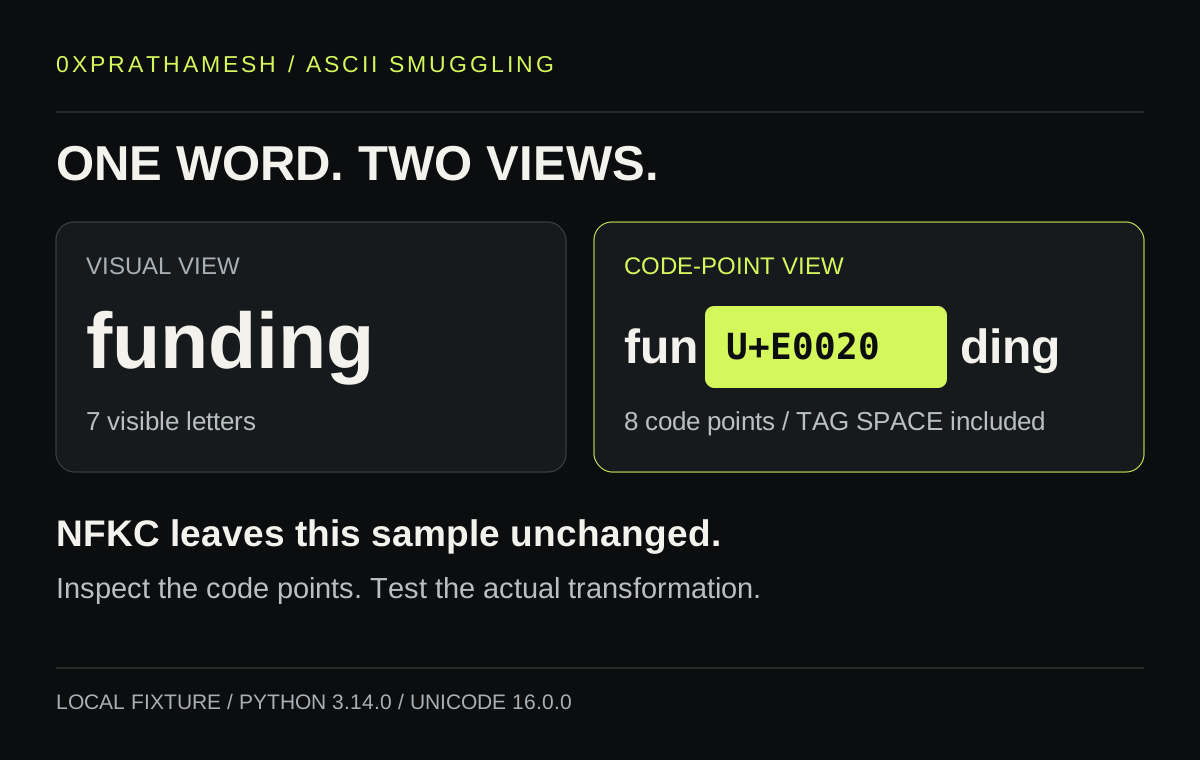
A small experiment: NFKC preserves the tag
This example uses one harmless word and one explicit escape sequence. It sends nothing, contacts no service and makes no claim about a particular model or commercial filter. The local run used Python 3.14.0 with Unicode database version 16.0.0.
import unicodedata

sample = "fun\U000E0020ding"
normalised = unicodedata.normalize("NFKC", sample)

print("Unicode database:", unicodedata.unidata_version)
print("Code points:", len(sample))
print("Literal match:", "funding" in sample)
print("NFKC unchanged:", normalised == sample)
print("NFKC match:", "funding" in normalised)

for position, char in enumerate(sample):
    if 0xE0000 <= ord(char) <= 0xE007F:
        print(position, f"U+{ord(char):05X}",
              unicodedata.name(char, "UNASSIGNED"))
The observed output was:
Unicode database: 16.0.0
Code points: 8
Literal match: False
NFKC unchanged: True
NFKC match: False
3 U+E0020 TAG SPACE
The seven visible letters are separated by an eighth code point. Python’s substring operation requires the characters of the search term to be contiguous. The inserted character interrupts that sequence, and NFKC leaves this sample unchanged. The output establishes that narrow behaviour in the recorded runtime; it does not establish how a tokenizer, a browser font or a security classifier will behave.
Unicode Standard Annex #15 defines normalisation around canonical and compatibility equivalence. NFKC performs compatibility decomposition followed by canonical composition. It can make certain alternative representations comparable, but it is not a general instruction to delete every non-rendering character. Unicode also cautions against applying compatibility normalisation blindly to arbitrary text because meaningful distinctions can be lost.
Python’s unicodedata documentation makes the operation and database version inspectable. Recording that version alongside the fixture is useful when the ingestion service later upgrades its runtime. A comment saying “sanitised” gives the next engineer much less to verify.
Expose the difference before changing the text
For investigation, I would preserve the original and create a readable inspection view. The following function renders tag-block characters as visible labels. This is a diagnostic display, not an instruction decoder or a production sanitiser.
def inspect_tags(text):
    return "".join(
        f"[U+{ord(char):05X}]"
        if 0xE0000 <= ord(char) <= 0xE007F
        else char
        for char in text
    )

print(inspect_tags(sample))
# fun[U+E0020]ding
Showing the position matters. A record saying “one unusual character” gives a reviewer little context. Showing the extra code point inside the word explains the failed match immediately. In a real interface, escape HTML and handle other control characters as well; this short function deliberately covers only the range being examined.
Now make the transformation explicit. For this isolated fixture, removing tag-block characters from a separate comparison copy restores the literal match:
comparison = "".join(
    char for char in sample
    if not 0xE0000 <= ord(char) <= 0xE007F
)
print("Comparison match:", "funding" in comparison)
# Comparison match: True
That result gives you a regression test for one text-processing condition. It says nothing about whether “funding” is a malicious word. The point is to make a documented comparison rule behave consistently while retaining the original input for analysis.
A flag emoji is a useful false-positive test
Deleting every tag character from every input is a poor general product policy. Unicode’s emoji specification defines legitimate tag sequences. England, Scotland and Wales flag emoji use a base flag followed by tag characters and a terminating tag. Removing the tags can change the displayed flag.
This gives the review a useful pair of fixtures: the interrupted word and a valid flag sequence. Both contain tag characters. Only one is being used here to interfere with word matching. The surrounding sequence and the field’s purpose determine how the application should handle it.
A customer comment field, a payment beneficiary identifier and a forensic evidence view need different rules. An identifier may have a narrow permitted character set. A comment should preserve ordinary language and emoji. An evidence view needs to expose surprising content without silently destroying it. Make those choices per field and publish them for the people who maintain the parsers.
For an AI application serving Indian users, an ASCII-only fallback is particularly costly. Names and messages may legitimately use Devanagari and other scripts. Include real language requirements in the test corpus. “English test messages still work” is too small a compatibility check for a multilingual product.
Make each consumer’s input traceable
Imagine a support assistant that classifies a ticket and drafts a response. This is a representative design, not a customer incident. The application may extract text from HTML, run a classifier, retrieve related tickets, assemble a model request and display a preview. A different transformation at each step can leave the operator approving a view that never matches the model’s input.
I would keep a record of the extraction and transformation version used for each derived view. Preserve the original in storage with appropriate access and retention controls, and associate the derived text with that record. The system should be able to answer which view was classified, which view reached the model, and which view a reviewer saw.
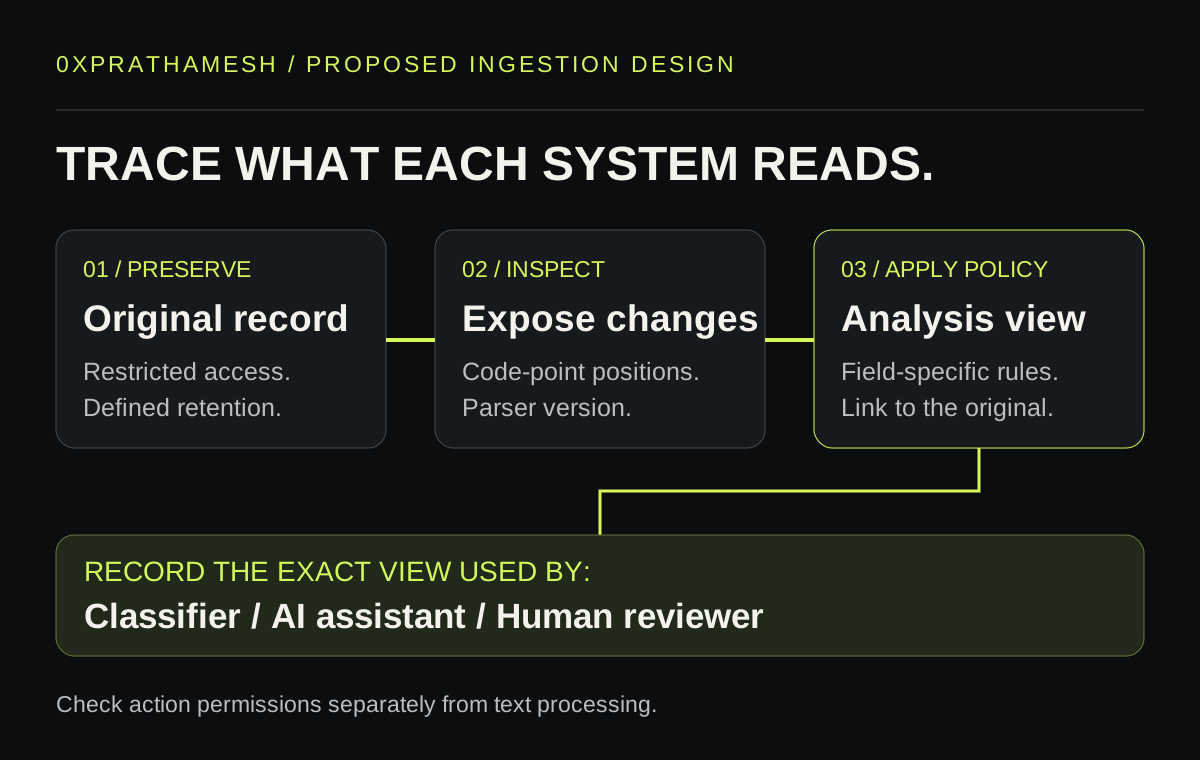
Keep transformations bounded. Do not recursively decode arbitrary content until it resembles readable instructions. That can turn obscure material into a new instruction surface and consume resources on malformed input. Specify which encodings the application accepts, enforce size limits, and surface a parsing failure instead of quietly sending an unexamined fallback into the model.
Preservation also has a cost. Raw tickets can contain personal or confidential information. A diagnostic feature should not copy every message into a broad telemetry channel. Reuse the controlled evidence store and give engineers synthetic fixtures when they only need to reproduce parser behaviour. The previous field note on AI log custody covers the permissions and retention questions around that store.
Readable instructions can still be untrusted
After a text-processing fix, the assistant may still encounter a perfectly visible request to change its task. A customer ticket can contain instructions addressed to the assistant even when every character is ordinary English. Text cleanup cannot decide whether that customer is allowed to change an internal workflow.
OWASP’s prompt-injection guidance recommends limiting privileges, separating external content and requiring human involvement for high-risk actions. In the support example, the backend should independently verify account scope and permission before changing a record. A ticket’s contents should not grant the assistant broader access.
For approval screens, show the actual proposed operation and its affected records. An innocent-looking excerpt from the ticket is weak evidence for approving a consequential action. Bind the approval to the operation the backend will execute, so a later model turn cannot quietly substitute a different destination or account.
A practical regression set
Start with cases small enough that an engineer can explain every outcome. Then run them through the complete application path, including the display and the model-request assembly. These are proposed acceptance checks, not measurements of any vendor’s product.
| Fixture | What to verify | Useful evidence |
|---|---|---|
| Ordinary text | The documented comparison still matches and the display stays readable. | Input, transformation version and decision. |
| One tag inserted inside a harmless word | Inspection exposes the position; the comparison policy has an explicit outcome. | Original and escaped views, plus the consumer’s actual input. |
| A valid subdivision flag emoji | A legitimate sequence does not become a blanket reason to reject the message. | Sequence classification and the resulting display. |
| Names and text in supported scripts | Processing preserves the product’s language requirements. | A representative multilingual corpus reviewed by language users. |
| Visible instructions inside a customer ticket | External text cannot authorise a privileged operation. | The backend permission decision and affected account. |
| Parser failure or oversized content | The failure path does not forward an unexamined substitute. | Error state, bounded processing and a reviewable fallback. |
Repeat the set after changes to HTML extraction, Unicode libraries, retrieval processing or the model integration. Where model behaviour varies, report repeated-run outcomes separately from deterministic parser checks. A string comparison that passes every time and an assistant that usually follows its task are different measurements.
Questions worth settling in the design review
Does NFKC remove invisible Unicode characters?
NFKC is not a general removal function. In the recorded Python test, U+E0020 TAG SPACE survived unchanged. Check the exact characters and runtime your application handles, then implement and test a separate policy where removal or visible inspection is required.
Do invisible characters always mean prompt injection?
No. Legitimate emoji sequences use tag characters, and unusual text may appear in security research or diagnostic material. Evaluate the sequence, source and intended use. A character-range match is evidence to interpret.
Will this fix stop prompt injection?
It can address a specific discrepancy in text handling. Prompt injection also works through readable content, so actions still need independent authorisation and restricted permissions. Measure the text-processing behaviour separately from the assistant’s response.
What should a CTO ask for first?
Ask the team to trace one synthetic message through the filter, the model request and the approval screen. Have them expose hidden code points and name every transformation. Then check whether any difference can affect an action the assistant is allowed to take.
The most useful result of that exercise may be a very ordinary bug: a parser running in the wrong order, an outdated comparison rule, or a preview built from a different field. Those are concrete fixes a team can ship and verify. Keep the fixtures beside the integration so the next update has to preserve the behaviour you agreed on.
One next action
If you run an agent that executes tools, AgentCrash is an open-source harness that crash-tests it in a synthetic workplace: synthetic tools, visual evidence and regression tests. It is built for exactly this problem, turning a containment claim into something you can run against the system instead of arguing about it in review.