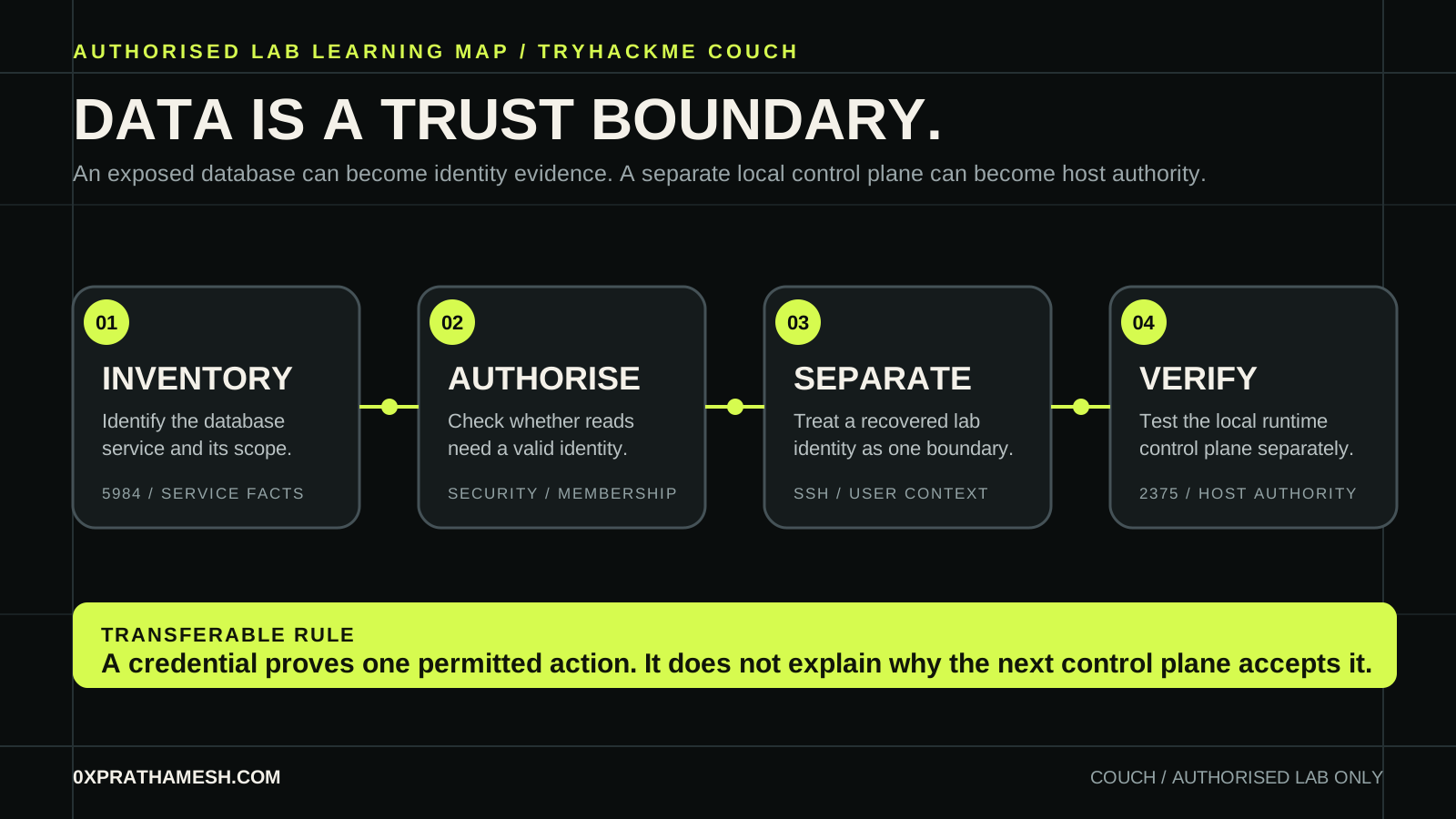
Couch asks a deceptively simple question: when a database accepts an unauthenticated request, what else does the system trust it to reveal? The lasting lesson is not a particular database URL. It is how exposure in one component becomes evidence for the next identity boundary, then meets a completely separate runtime boundary.
The room is intentionally vulnerable. The commands below are bounded to its allocated machine and only demonstrate observation. Flags, database values, credentials and the root path are withheld. That forces attention onto the security decisions a real team can review and repair.
01 · Scope and learning model
The official room asks the learner to identify an exposed database service, locate its administration interface, establish the user context, and then investigate a privilege boundary. That order matters. A credential recovered from an improperly exposed record may establish a low-privilege session, but it does not grant the user authority over the host.
| Stage | Question | Evidence to retain |
|---|---|---|
| Observe | What service is exposed and where? | Protocol, port, banner and the authorised target scope. |
| Authorise | Does the database require a valid identity for this read? | A normal unauthenticated response or an access denial. |
| Separate | What can the recovered lab user do? | User ID, groups, listening local services and file ownership. |
| Verify | Can a local control interface change host authority? | A bounded lab-only validation and the reason its policy allowed it. |
Memory aid: service, policy, identity, authority. Treat each as a fresh claim that needs its own evidence.
02 · Inventory the database service
Begin with the address TryHackMe allocated to your own session. Do not paste an address from a screenshot or another learner's notes. The goal of a first scan is a service model, not an immediate attempt to retrieve data.
# Scope this variable to your own active TryHackMe machine.
export LAB_HOST="<authorised-lab-host>"
nmap -sV -sC --reason "$LAB_HOST"
curl -sS "http://$LAB_HOST:5984/"
The room presents SSH and CouchDB. A CouchDB welcome response and version indicator support a narrow hypothesis: a document database is listening over HTTP. They do not prove anonymous database access, a valid application user, or host compromise. Keep those claims separate.
Apache CouchDB documents a security model based on server administrators and database-specific members and admins. An HTTP listener becomes dangerous when its authentication and database-security policy make sensitive documents available to a caller who has not established a valid identity.
03 · Read the access policy before collecting data
CouchDB exposes its web administration interface at /_utils. In this lab, that interface is a clue about the product and a place to inspect the room's intentionally unsafe configuration. In an authorised assessment, begin with the least invasive request that answers a policy question. Do not dump every database because a service responds.
# Read-only service checks, limited to the assigned lab.
curl -sS "http://$LAB_HOST:5984/_all_dbs"
curl -sS "http://$LAB_HOST:5984/<lab-database>/_security"
Apache's documentation is a useful comparison point. Modern CouchDB expects an administrator to exist, protects privileged operations, and distinguishes database members from database administrators. It also explains why its _users database needs restrictive access: user records can contain identity and sensitive account information.
For the room, a readable application document exposes a lab-only identity. Keep it private. The security finding is not “a password was found”; it is “a data store made a secret retrievable by an unauthenticated request”. That finding survives any later password rotation.
Require a server administrator, set database security explicitly, bind administrative services to trusted networks, and remove credentials from application documents. A document database is still a data boundary.
04 · A user session is not host authority
Validate a recovered room credential once, against the assigned SSH service, then inspect only the permissions relevant to the next decision. The right question is not “what can I run?” It is “which local component accepts this user's influence?”
# After authorised lab access, establish the current privilege context.
whoami
id
ss -lntp 2>/dev/null
find "$HOME" -maxdepth 1 -type f -name '.*history' -ls 2>/dev/null
The representative path in Couch includes a history artefact that points to a local container-management endpoint. The history does not make the endpoint safe or unsafe by itself. It tells the learner to form a testable hypothesis: a service bound to loopback may still be powerful when a local user can reach it without an independent authorisation check.
This distinction matters in production. Loopback prevents a remote network client from connecting directly, but it does not create a permission model for every process already on the host. A web-server worker, CI runner, developer shell or compromised application account can all become a local client.
05 · Inspect the local container control plane
Docker's daemon API is a control plane. It can manage images, containers, mounts and network settings. If an untrusted local client can create a privileged container with a host filesystem mount, that client has crossed from container administration into host authority. The room intentionally places that boundary behind a local listener.
# Read-only confirmation of the local API, in the authorised room only.
curl --unix-socket /var/run/docker.sock http://localhost/version 2>/dev/null || true
curl -sS http://127.0.0.1:2375/version 2>/dev/null || true
Use only the interface the room exposes. One of these checks may fail, and that failure is useful evidence about the endpoint type. Do not expose Docker's daemon remotely, and do not publish a command that turns a host mount into an interactive privileged environment. In a learning room, use the platform's hints or your private notes to make the smallest controlled validation, then return to the boundary explanation.
| Control-plane fact | Why it matters | Safe response |
|---|---|---|
| The API listens only on loopback | Remote reachability is reduced, yet a local process can still ask for powerful operations. | Enforce daemon authorisation and isolate untrusted workloads from the host. |
| A client can create privileged workloads | Container isolation can be removed by design. | Restrict privileged mode and review admission policies. |
| A client can mount host paths | The host filesystem becomes available inside the workload. | Limit mount sources, use read-only root filesystems and review runtime events. |
The transferable concept is capability, not Docker syntax. An API that accepts instructions to manage the host must independently authenticate and authorise its caller. “It is only local” is weak evidence when the machine already contains lower-trust local workloads.
06 · Detection and repair
There are two independent fixes. CouchDB needs authentication and database security. The host needs a runtime policy that prevents arbitrary local clients from becoming container administrators. Fixing one does not erase the other.
| Finding | Impact | Repair and detection |
|---|---|---|
| Unauthenticated CouchDB reads | Sensitive documents can disclose identity material. | Create administrators, set database membership, require TLS and alert on unexpected database reads. |
| Secrets stored in application records | A data-access mistake becomes an authentication incident. | Move secrets to a managed secret store, rotate exposed values and limit service-account scope. |
| Unauthorised Docker control-plane access | A local client can request host-affecting operations. | Disable unauthenticated TCP exposure, restrict socket access, and monitor container-create and mount events. |
| Privileged workloads with host mounts | Container confinement no longer protects the host. | Block privileged workloads by policy, minimise capabilities and review every host-path mount. |
For a practical regression check, create a non-administrator test identity and verify it cannot enumerate sensitive databases, read application secrets, query the runtime API, create privileged workloads or mount host paths. A successful login is not a sufficient test. Verify each high-impact operation separately.
What Couch is really teaching
Couch is not a story about a database brand or a memorable local port. It is a reminder that information becomes capability when another component trusts it. A document leaked a lab identity. A local service then represented a separate, stronger authority boundary. Good investigation keeps those transitions visible.
When reviewing another authorised environment, ask which data stores carry credentials, who can read them, which process trusts those credentials, and what control plane that process can reach. That chain is usually more useful than starting from an exploit name.
Frequently asked questions
What makes CouchDB different from a normal database target?
CouchDB's API is HTTP-native and can expose configuration, databases and user lists when access policy is misconfigured. Data becomes identity evidence.
Is a database user session host authority?
No. A valid database session is a boundary, not a privilege. The route to host control runs through the local container control plane and its API.
What is the defensive takeaway?
Separate database authorisation, credential storage and container runtime access. Each needs its own policy review, image baseline and log source.
Primary references and further practice
- TryHackMe: Couch official room
- Apache CouchDB: Security documentation
- Docker Engine: security documentation
- Docker Engine: protect daemon socket access
- For a related identity-boundary exercise, read Basic Pentesting: Evidence to Access or browse all authorised write-ups.